Clicky Upgrades Explained: Faster Buttons, Triggers, and Bumpers
The stock DualSense feels great in the hand, but its inputs are built for comfort. The face buttons have a soft, slightly spongy press, and the triggers have a long analogue pull designed for racing games and adaptive-trigger effects. For everyday play, that is fine. For competitive play, this design choice will cost you because every millimetre of travel and every mushy press is time and certainty you do not get back.
Clicky upgrades fix that by swapping the soft stock feel for a crisp, tactile, mouse-click actuation. Instead of pressing through travel and hoping the input landed, you get a short, definite click with clear feedback, the same satisfying certainty you get from a good gaming mouse. TCP offers this across three parts of the controller, the face buttons, the triggers, and the bumpers, and across most modern PlayStation and Xbox pads.
Here is what each clicky upgrade does, how it changes the feel, which controllers can take it, and which players actually benefit from it.
What Does ‘Clicky’ Actually Mean?
The clearest way to understand a clicky input is to think about your mouse. A good gaming mouse button has a short, definite press with a crisp click and an instant, obvious point where it registers. There is no vagueness, no squishy travel, just a clean actuation you can feel and hear, which is why competitive players are so particular about their mice. They need that tactile, visual, and audio feedback to know that what they’re doing is right and this translates directly into their performance.
A clicky controller input brings that same feel to your pad. Where a stock input has a longer, softer press that can leave you unsure whether it registered, a clicky input is short and definite, with clear tactile feedback the instant it fires. The practical benefits are faster actuation because there is less travel to push through, more consistent presses because the actuation point is always in the same place, and clearer confirmation because you can feel exactly when the input landed. In a fast game, those three things add up, well, fast.
Trait
Stock input
Clicky input
Press feel
Soft, longer travel
Short, crisp, definite
Actuation point
Vague, varies by press
Consistent every time
Feedback
Little tactile confirmation
Clear click you feel and hear
Speed
Slower through the travel
Near-instant
Best suited to
Comfort and casual play
Competitive and input-heavy play
Which Controllers Can Get Clicky Upgrades?
These upgrades are not PlayStation-only, and they are not all available on every pad. Clicky face buttons and clicky triggers cover the widest range, from the Xbox Series controllers and the Xbox Elite Series 1 and 2 through to the PS4 DualShock 4, the PS5 DualSense, and the DualSense Edge. Clicky bumpers are the exception, and the table shows why.
Upgrade
Available On
Notes
Clicky face buttons
Xbox Series, Xbox Elite Series 1 and 2, PS4, PS5, DualSense Edge
Great for claw grip
Clicky triggers
Xbox Series, Xbox Elite Series 1 and 2, PS4, PS5, DualSense Edge
Replaces the adaptive and analogue trigger feel
Clicky bumpers (L1/R1)
PlayStation only (PS4, PS5, DualSense Edge)
Xbox bumpers are already clicky. Edge option keeps adaptive triggers
If your controller is not listed, or you are not sure which upgrades it can take, the modifications page has the current compatibility, and you can always just ask us.
Clicky Triggers: Instant Fire
A stock trigger has a long analogue pull, which is exactly what you want in a racing game where you are feathering the accelerator, or when you want to feel an adaptive-trigger effect tense up under your finger. For shooting, though, that long pull is dead weight, because you are travelling through millimetres of movement every single time you want to fire.
Clicky triggers, often called digital triggers, cut that travel down to a short, mouse-like click, so your shots fire the moment you press rather than at the end of a pull. In a fast semi-automatic firefight or a fighting game where trigger timing matters, that near-instant actuation is a real, measurable edge. You are simply faster on the draw, and every shot lands with the same consistent press.
The tradeoff is worth stating plainly. Converting a trigger to a clicky, digital press means giving up the analogue range, so you lose the fine control that helps in driving games and the resistance of the adaptive triggers on that trigger. For a shooter or fighting-game player, that is a trade worth making every time. For someone who splits their time between racing games, it is a genuine decision, which is why some players clicky-upgrade one trigger and leave the other, or skip trigger mods entirely and stick to the face buttons.
Clicky triggers are available on the widest range of pads of any of these upgrades: the Xbox Series controllers, the Xbox Elite Series 1 and 2, the PS4 DualShock 4, the PS5 DualSense, and the DualSense Edge. If you want to go deeper on the trigger side specifically, our controller modifications page lays out the options.
Clicky Face Buttons: Faster, More Definite Inputs
The face buttons, cross, circle, square, and triangle, get the same clicky treatment, turning the soft stock press into a crisp, mouse-like click. It sounds like a small change, but for anything input-heavy it is one of the most noticeable upgrades you can feel.
Fighting games are the obvious winner, where combos live and die on the precision and speed of your button presses, and a definite click means every input is faster and more reliable than a spongy stock press. Rhythm games benefit for the same reason, as does any game where you are hammering the same buttons in quick succession and need to know each one registered. The clear feedback means you never have to wonder whether a press landed, because you felt it click.
Clicky face buttons are also a natural fit for claw grip. If you play claw, with a finger curled over the face buttons rather than your thumb resting on them, a tactile button gives you noticeably better feel and feedback on every press, so you always know the input landed even in the middle of a combo. You can add clicky face buttons across the Xbox Series controllers, the Xbox Elite Series 1 and 2, the PS4 DualShock 4, the standard PS5 DualSense, and the DualSense Edge.
Clicky Bumpers: Crisp L1 and R1
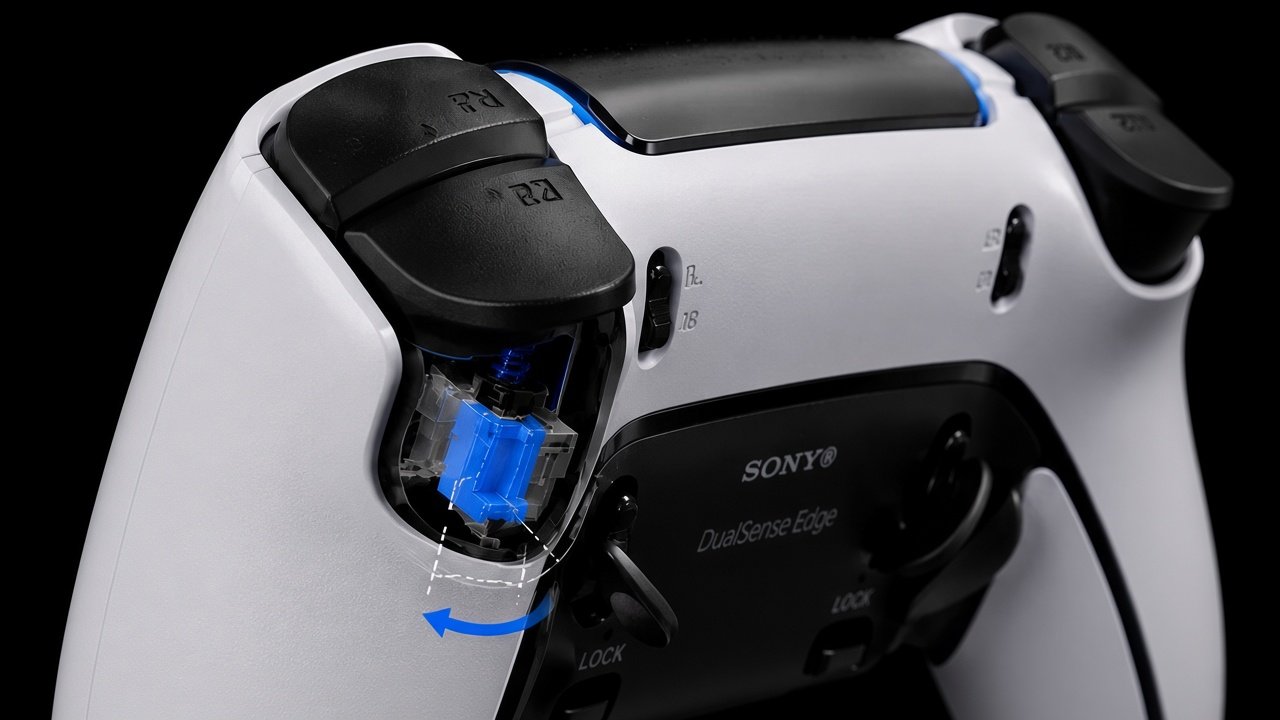
The bumpers, L1 and R1, round out the set. Stock bumpers are already fairly clicky compared to the triggers, but the upgrade sharpens them further into a crisper, more tactile press that is faster and more reliable under pressure.
This matters more than you might think, because L1 and R1 often carry the actions you cannot afford to fumble: the weapon wheel, a special ability, a block or a parry. When those inputs are on a crisp, definite bumper, you get them out faster and with more certainty, which in a tense moment is exactly what you want. For anyone who relies on their bumpers for important actions, this is a quietly valuable upgrade.
One detail worth knowing: clicky bumpers are a PlayStation upgrade. Xbox controllers already ship with crisp, clicky bumpers from the factory, so there is nothing to add there, but on PlayStation pads the softer stock bumpers can be sharpened right up. We offer clicky bumpers across the PS4 DualShock 4, the PS5 DualSense, and the DualSense Edge.
There is one more reason the bumpers matter, and it is specific to the Edge. Clicky triggers, as covered above, mean giving up the adaptive triggers. For Edge owners who love the adaptive triggers and the Edge’s adjustable trigger stops, we offer clicky L1 and R1 as a way to get that crisp, tactile upgrade without touching the triggers at all. You keep the adaptive feel and the trigger stops you paid for, and you still get a clicky upgrade where it counts. Not many companies offer that choice, and for the right player it is the best of both worlds.
Who Should Get Clicky Upgrades?
Clicky upgrades are not a one-size-fits-all mod, and the right combination depends on what you play. Here is how the three break down by genre.
If you play…
Consider
Shooters (fast semi-auto fire)
Clicky (digital) triggers
Fighting or rhythm games
Clicky face buttons and triggers
Claw grip, any genre
Clicky face buttons
Competitive anything, wanting reliability
Clicky bumpers and face buttons
Driving games or games using adaptive triggers
Keep stock triggers, add clicky face buttons or bumpers
If you play a lot of racing games, or you love the feel of adaptive triggers in your single-player games, converting your triggers would be giving up the exact thing you enjoy. The good news is that the upgrades are independent, so you can add clicky face buttons and bumpers for the speed while leaving your stock triggers in for the analogue feel. You do not have to take the whole set to get most of the benefit, and on the Edge the clicky bumpers are lets you keep your adaptive triggers while still getting that crisp click.
Do Clicky Upgrades Work With Other Mods?
They do, and that is part of the appeal. Clicky inputs are their own upgrade, separate from what you do with the sticks or the back of the controller, so they stack cleanly with everything else in a custom build. A competitive setup often pairs clicky face buttons and triggers with drift-proof TMR sticks and a set of rear inputs, and each part does its own job without stepping on the others.
The logic is simple: clicky inputs make your presses faster and more certain, TMR sticks keep your aim and movement precise with no drift, and rear inputs keep your thumbs on the sticks while you do more. Put together, they turn a stock pad into something built around speed and reliability from front to back.
If you want the sticks side of that equation, our Hall Effect vs TMR breakdown explains why contactless sticks never drift, and the rear-input options sit alongside the clicky upgrades in the builder.
How to Get Clicky Upgrades at TCP
There are a few ways to add clicky inputs, depending on whether you are building fresh or upgrading a pad you already own.
Option
What It Is
Build from scratch
Add clicky face buttons, triggers, or bumpers in the custom builder.
Send-in upgrade
Send in a controller you already own and have the clicky inputs fitted.
Pre-built pro controller
Get a controller with the competitive upgrades already done.
The simplest route is to choose your clicky inputs while putting a pad together in the custom PS5 controller builder, where you can mix and match exactly the ones you want. If you already have a controller you love, the PS5 DualSense upgrades send-in service adds the clicky inputs without you needing to buy a new pad. And if you would rather have the work done for you, the TCP Pro and TCP Ultimate come built for competitive play.
You’ll find the full menu of what you can add on the modifications page, and again, if you have any questions, you can always just ask us.
Crisp, Fast, and Built for the Way You Play
Build fresh or send in a pad you already own, and TCP fits the clicky inputs.
Clicky upgrades take the soft, comfort-first inputs of a stock controller and turn them into something crisp, fast, and certain, the same feel that makes a good gaming mouse a joy to use. Clicky triggers give shooters and fighting-game players near-instant fire, clicky face buttons make combo-heavy games faster and more reliable (and claw players feel the difference most), and clicky bumpers sharpen the inputs you cannot afford to fumble. The only real decision is the triggers, where you weigh instant fire against analogue feel, and even then you can take the face buttons and bumpers on their own.
A confiança é o elemento mais importante num casino online https://slotlaircasinoo.com/pt-pt/. No Slotlair Casino, sabemos que tal fiabilidade tem início quando o seu dinheiro se
Tervetuloa U Spin Casinon jännittävään maailmaan. Tämä alusta on rakennettu suomalaisille, ja se kokoaa runsaan pelivalikoiman aidosti suomalaiseen otteeseen. Meillä jokainen napsautus, jokainen pyöräytys, antaa
Hos Spinanga Casino i Norge finner vi en særegen blanding av klassiske og nyskapende spillalternativer som passer for alle typer deltakere sspinanga.it.com. Atmosfæren summer av



No comment yet, add your voice below!